

The Google Ads Negative Keyword List Most SMB Accounts Are Missing

Negative keywords stop your budget from serving clicks that were never going to convert. Most SMB accounts have a list, but it stops at the basics: “free,” “jobs,” a competitor name or two. That catches the obvious waste and misses whole categories still draining spend. Below is the list, plus what changed in Performance Max in 2026 that makes it worth revisiting your account now.
Open the search terms report on almost any SMB Google Ads account and the same pattern shows up. A landscaper paying for “landscaping jobs near me.” A dentist paying for “dental assistant salary.” A software company paying for “free [competitor] alternative” from someone who was never going to pay for anything, from you or anyone else.
None of these accounts are missing negative keywords entirely. Most have a list. It’s the generic one every PPC checklist recommends: exclude “free,” exclude “cheap,” exclude a handful of competitor names, done. That list catches the obvious waste and leaves the categories below untouched, and those are usually the bigger drain.
What Are Negative Keywords in Google Ads?
A negative keyword tells Google Ads which searches should never trigger your ad. Add “free” as a negative and your ad stops showing for “free landscaping quote,” even though “landscaping quote” is exactly what you want to rank for. They apply across Search, Shopping, and, as of early 2026, Performance Max campaigns too.
If you haven’t set up conversion tracking and campaign structure properly, negative keywords are optimizing a campaign that’s still measuring the wrong thing. Worth checking your Google Ads setup first if that foundation isn’t solid.
The Negative Keyword Categories Most SMB Accounts Skip
Job seekers and career searchers.
Anyone searching for a job at your company, or in your industry generally, looks a lot like a customer to a broad match. Exclude: “jobs,” “careers,” “hiring,” “salary,” “internship,” “how to become a [your role].”
DIY and self-service searchers.
If you sell a done-for-you service, someone searching “how to” or “diy” is telling you directly they’re not buying yet, and may never. Exclude: “diy,” “how to,” “yourself,” “tutorial,” “step by step.”
Wrong-service confusion terms.
Broad match doesn’t know the difference between a plumber and a plumbing supply store, or an electrician and an electrician training program. Pull your search terms report and look for near-misses in your own industry specifically. There’s no universal list for this one; it’s account-specific by definition.
Research-only and definition queries.
These readers want to understand a concept, not hire anyone yet. Exclude: “what is,” “definition,” “meaning,” “examples of,” “template,” “sample.”
Competitor research without buying intent.
“[Competitor] reviews,” “[competitor] complaints,” “[competitor] vs [competitor]” pull in people comparing two other companies, not you. If you can’t win that specific comparison on price or feature parity, you’re funding someone else’s research.
Geography outside your service area.
Geo-targeting narrows where ads can show, but broad match still leaks queries mentioning a city or region you don’t serve. Add every nearby city you don’t cover as an explicit negative, not just a targeting exclusion.
Vendor and supplier-side searches.
A consumer-facing business gets hit with “wholesale,” “supplier,” “distributor,” “bulk,” and “manufacturer” queries from people looking to buy from you at scale or resell, not book your service.
Discount-seekers, when discounting isn’t your model.
“Cheap,” “cheapest,” “coupon,” “promo code,” and “discount” belong on every premium or mid-market account’s negative list. If your ROAS math doesn’t work for price-shoppers, don’t pay to educate them.
Academic and media-only intent.
“Case study,” “research paper,” “pdf,” “video,” and “youtube” indicate someone gathering information for a report or a class, not a purchase decision.
Run your search terms report against this list once, then treat it as a starting point, not a finished asset. The account-specific confusion terms only show up once you’ve actually looked.
How to Add Negative Keywords in Google Ads
- Campaign-level: Inside the campaign, go to Keywords > Negative Keywords, then add terms individually or upload a list.
- Ad group-level: Use this when a term should be excluded from one ad group but is still relevant elsewhere in the same campaign.
- Account-level shared lists: Build a master negative list once, apply it across every campaign that shares the same exclusions (job terms, DIY terms, competitor names). Update the shared list and every linked campaign inherits the change.
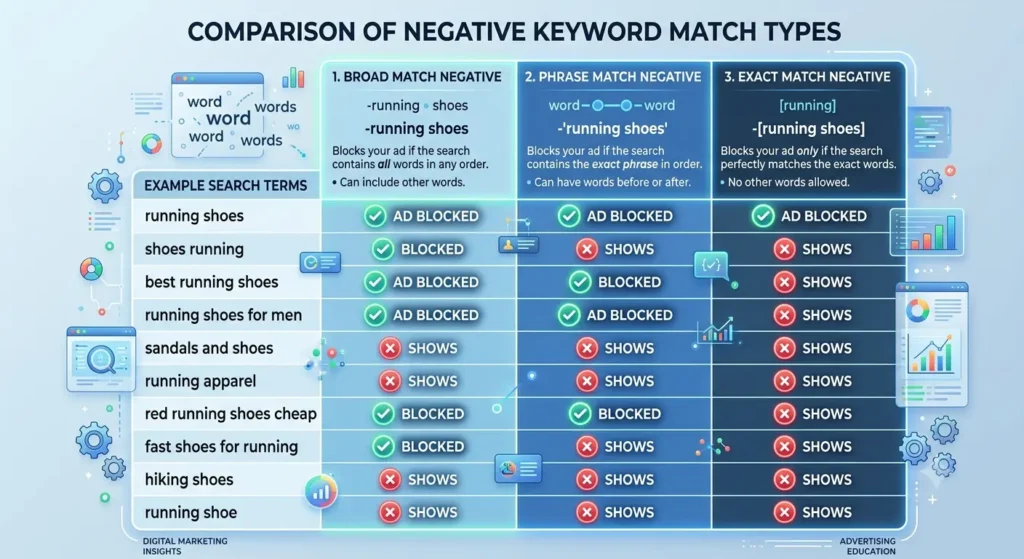
- Match type matters: broad negative blocks any search containing all your terms in any order; phrase negative blocks the exact phrase in that order, with extra words allowed before or after; exact negative blocks only that specific search. Most SMB negative lists should default to phrase match, broad match negatives can accidentally block traffic you actually want.

What Changed in Performance Max for 2026
Until recently, Performance Max was largely a black box on negative keywords; advertisers had limited account-level exclusion options and no real campaign-level control. That changed with Google’s 2026 rollout: campaign-level negative keywords are now available inside PMax, alongside expanded account-level lists that apply across Search, Shopping, and PMax together.
Practically, this means the list above now applies to PMax accounts the same way it applies to Search campaigns. If you’ve been running PMax since before 2026 and haven’t revisited negative keywords since, this is a genuine reason to go back in. Confirm current limits and rollout status in your own account before planning around a specific number; Google has been expanding these limits in stages through the year.
If your Google Ads results still aren’t where they should be after cleaning up negatives, the issue is often somewhere else in the account.
Here are the other five real reasons Google Ads campaigns don’t convert.
How Often to Review Your Negative Keyword List
Negative keywords aren’t a set-and-forget asset. New irrelevant queries slip through even with a strong list applied, especially on broad match campaigns and PMax. Pull the search terms report every one to two weeks for active campaigns, monthly at minimum for lower-spend accounts. Every wasted click you catch late is a budget that could have gone toward the ROAS you’re actually trying to hit.
FAQ
What are negative keywords in Google Ads?
A negative keyword is a search term you exclude from triggering your ads. Adding “free” as a negative stops your ad from showing on searches like “free consulting,” even if “consulting” is one of your target keywords. They work across Search, Shopping, and, since 2026, Performance Max, and they’re one of the fastest ways to cut wasted spend without lowering bids.
How do I add negative keywords to a Google Ads campaign?
In Google Ads, go to Keywords > Negative Keywords within the campaign, then add terms one at a time or upload a list. For terms you want excluded everywhere, build a shared negative keyword list at the account level and apply it to every relevant campaign instead of repeating the work per campaign.
What’s the difference between broad, phrase, and exact match negative keywords?
Broad match negatives block any search containing all your listed terms, in any order. Phrase match negatives block that exact phrase, allowing other words before or after it. Exact match negatives block only that specific search string. Most SMB accounts should default to phrase match; broad negatives can quietly block searches you actually wanted.
How often should I update my negative keyword list?
Review the search terms report every one to two weeks for active, higher-spend campaigns, and at least monthly for smaller accounts. New irrelevant queries appear continuously, particularly on broad match and Performance Max, so a list built once and never revisited loses effectiveness within a few months.
Do negative keywords work with Performance Max campaigns?
As of Google’s 2026 rollout, yes. PMax now supports campaign-level negative keywords alongside expanded account-level lists, closing a gap that existed for years when PMax offered little to no negative keyword control. Confirm current limits in your own account, since Google has expanded them in stages through the year.
Where do I find a negative keyword list template?
Generic templates exist, but they only cover the obvious categories: job terms, “free,” a few competitor names. The categories that actually save budget, like wrong-service confusion terms and geography leakage, are account-specific and only surface once you’ve pulled your own search terms report. Use a template as a starting point, not a finished list.
A generic negative keyword list catches the obvious waste. The categories above catch the rest, and with Performance Max finally supporting real negative keyword control in 2026, there’s no longer a good reason to leave PMax spend unmanaged while your Search campaigns stay clean. Pull your search terms report this week and check it against the list.
Still finding new wasted spend every month?
Our Google Ads management service includes ongoing search terms audits, not a one-time cleanup, so the same waste doesn’t keep coming back.

Author
Carlos Rios
Carlos Rios is the Founder of Tabula. Before starting the agency, he spent his career inside companies — reporting to leaders who had no patience for vanity metrics and wanted straight answers about what was working and why. He built Tabula around that same standard: a marketing system the client owns, powered by AI and led by experts who explain the plan in plain language. Carlos studied philosophy for six years at York University and holds a Master's in Marketing from the Schulich School of Business.