

Google Business Profile Optimization in 2026: What Works, What Doesn’t, and What Gets You Suspended

Most guides to Google Business Profile optimization were written before April 2026. Some of the tactics they recommend will now get your listing removed.
That is not a scare line. Google ran a mass suspension wave on 27 April 2026 that pulled thousands of listings out of Maps, then escalated in May to restricting entire Google accounts rather than individual profiles. On 16 April 2026 it switched on Gemini-powered edit moderation, which screens profile changes before they publish. Alongside that, Google tightened its review and content policies to explicitly ban several practices that were standard agency advice a year ago.
So the question is no longer just “how do I optimize my Google Business Profile.” It is “which parts of the advice I have been following are still legal.”
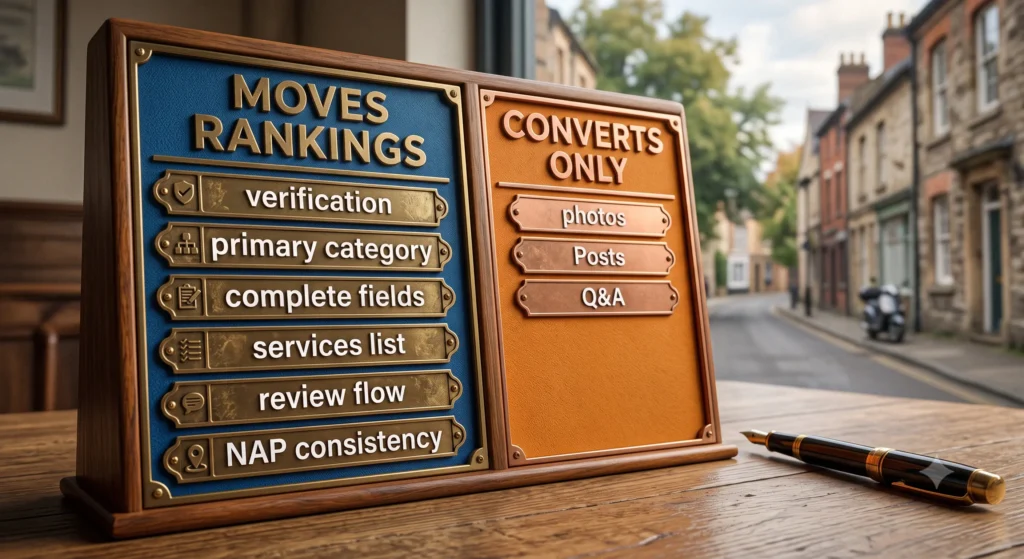
Ranking in the local pack comes down to a small number of levers: verification, an accurate and narrow primary category, complete profile fields, listed services, steady review flow, and consistent name, address and phone data across the web. Photos, Posts and Q&A matter for conversion, not for pack position. And anything that fabricates engagement, from seeded questions to gated review requests, is now an enforcement risk rather than a growth tactic.
What Changed in 2026 (And Why Old Advice Is Now Risky)
Three shifts matter.
Enforcement moved to the account level.
Before 2026, a policy problem meant one listing got suspended. The May wave introduced account-level restriction, which suspends every profile tied to that account. For a business with multiple locations, or an agency managing profiles from a single login, that changes the risk calculation completely.
Moderation became pre-publication.
Gemini-powered edit moderation reviews changes before they go live. Editing your name, address, category and phone in one sitting now reads as an attempted hijack, particularly on a new or recently reinstated profile. Space out material edits.
The review and content policies got specific.
Google’s early-2026 updates prohibit review gating (pre-screening customers by sentiment and only sending the review link to happy ones), incentivised reviews, on-premises review kiosks and tablets, and asking customers to mention a staff member by name. Separately, the content policy now permits AI-assisted drafting of posts, descriptions and review responses, but prohibits AI-generated reviews and AI-generated Q&A answers posted as though they came from a real customer.
If your current review process involves a “how was your experience?” text that branches based on the answer, that process is now a violation.
The Three Things Google Actually Ranks On
Google documents three factors for local results: relevance (how well your profile matches the query), distance (how close you are to the searcher), and prominence (how well known and trusted your business appears).
You cannot influence distance. Everything below is either a relevance lever or a prominence lever, and knowing which is which stops you spending time on the wrong thing.
The Levers That Move Rankings
Verification
An unverified profile is effectively absent from competitive local results. Video verification is now the default for new listings in most regions. Record one continuous take showing exterior signage, the interior, and you performing a real management action, such as unlocking a till or accessing a booking system. Cutting between shots is the most common reason a first attempt fails.
Verification proves the business exists. It does not grant immunity. A verified profile can still be suspended in an algorithmic sweep.
Primary Category
This is the highest-leverage single field on the profile. It determines which searches you are even eligible to appear for.
Choose the narrowest category that is accurately true. A law firm listed under “Law Firm” and the same firm listed under “Personal Injury Attorney” will see materially different Maps visibility. Broad categories dilute relevance.
To find the right one: search your core service plus your city in Google Maps, open the top three profiles in the pack, and read the category displayed under each business name. If your competitors are more specific than you are, that is your first fix.
You can add up to nine secondary categories. Use them for services you genuinely offer. Stacking unrelated categories to catch extra queries is one of the behaviours that triggers a review.
Complete Fields and the Description
Completeness is a confidence signal. Fill every field: business name exactly as it appears on your signage and legal registration, address, phone, website, regular hours, special hours for public holidays, and service area if you operate without a storefront.
The description gives you 750 characters. Use them to say what you do, who you serve, and what your approach is. Include your service area naturally. Do not keyword-stuff it. Keyword-stuffed content is precisely what pre-publication moderation is looking for.
Services and Products
Most SMBs skip this section, which is why filling it in is still an edge. List each service with a name and description. Be specific: “Commercial Roof Inspection” carries more matching signal than “Roofing.” This section also feeds the summaries Google generates about local businesses, so leaving it blank means Google infers your services, often wrongly.
Reviews: Volume, Velocity, and the New Rules
Reviews remain one of the strongest prominence signals. What has changed is how you are allowed to get them.
Velocity now matters more than raw count. A steady flow across ninety days is a healthier signal than fifty reviews in a fortnight followed by silence. Bursts look manufactured.
The compliant way to ask: send every customer the same request, through the same channel, with a direct link, shortly after the work is done. Same message, same timing, no branching on sentiment, no discount attached, no tablet on the counter, no request that they name the person who served them.
Respond to all of them. For negative reviews, acknowledge, stay factual, and move the detail offline. Prospects read your responses more carefully than they read the complaints.
NAP Consistency
Your name, address and phone number need to match across your profile, your website, your legal registration and every directory you appear in. Mismatches reduce confidence and, since 2026, contribute to suspension risk rather than just soft ranking suppression. Google now cross-checks against sources outside the profile itself.
The Levers That Convert But Don’t Rank
This is where most guides mislead you. These three matter. They just do not do what people claim.
Photos
Photos drive clicks, calls and direction requests. They do not appear to move pack position directly. Upload real exterior shots (so customers can physically find you), interiors, team, and completed work. Skip stock imagery entirely.

Add something monthly rather than dumping twenty images at setup. Recency reads as an operating business.
Google Posts
Posts lift engagement in the local panel. They are not a direct ranking signal. Treat them as a conversion asset, not an SEO tactic, and budget your time accordingly. A weekly rotation costs five minutes: a completed job one week, a service tip the next, a specific service with a booking link, then an answer to a common question.
Q&A
The Q&A section is publicly editable. Anyone, including a competitor, can post an answer, and most owners find out only after something wrong has been sitting there for months.
Do not seed it with a second account. Posting questions as a fictitious customer, or posting AI-written answers dressed up as customer answers, is a content policy violation as of early 2026. Plenty of guides still recommend it. Ignore them.
What to do instead: monitor the section monthly, answer genuine questions within a day from the owner account where the response is clearly from the business, and report inaccurate answers. If there are questions you wish customers would ask, put those answers in your description, your services section and your website FAQ, where they belong.
What Will Get Your Profile Suspended
The recurring triggers reported through the 2026 waves:
- Keyword-stuffed business name. “Best Roofer San Antonio 24/7 Storm Repair” instead of the registered trading name. Trades, locksmiths and movers were hit hardest because these industries leaned on the tactic longest.
- Address problems. A virtual office, a coworking desk, or an address that does not match your registration.
- Category and premises mismatch. A listing claiming a storefront category with no storefront.
- Duplicate profiles at one address.
- Rapid multi-field edits, especially on a young profile.
- Fake engagement, covering fake reviews, gated review collection and manufactured Q&A.
If you are suspended: find and fix the trigger before you appeal. Appealing a profile that still breaks the rule is the fastest route to a denial. Since Google’s July 2026 appeal workflow update you can upload supporting evidence directly, and you should: dated exterior signage photos, a lease or utility bill matching the address, and a plain explanation of any recent changes. Never create a replacement listing while a profile is under review. Google now stacks penalties on repeat violations rather than resetting each time.
How Your Profile Feeds AI Local Answers
When someone asks an AI assistant for a recommendation near them, the structured data on your profile is a primary input. Categories, listed services, hours, attributes and review text are the material those systems summarise from.
The practical consequence: sparse profiles get summarised badly or omitted. A profile with every service explicitly named, accurate attributes and a description written in plain sentences gives an answer engine something concrete to work with. A profile with a two-line description and no services list gives it nothing, so it infers, and inference is where wrong information comes from.
This is the same principle behind ranking in AI search engines generally: unambiguous, structured, verifiable information wins. Local is simply the version of it where the structured data already exists and most businesses have left it half empty. It is also why AI search visibility work and local SEO are increasingly the same job.
Reading the Performance Dashboard
The Performance tab shows how people found you and what they did next. One metric matters more than the others: discovery searches, meaning people who found you by searching a service rather than your business name. That is your new-customer pool.
Low discovery searches means a relevance problem, and relevance problems are almost always category problems. High discovery searches with low website clicks or calls means people are finding you and choosing someone else, which is a photos, hours, description or review problem, not a ranking one.
Check it monthly and connect each change to what you edited four to six weeks earlier.
The GMB Optimization Checklist
Working order, highest leverage first:
- Verify the profile
- Set the narrowest accurate primary category
- Audit secondary categories and remove anything you do not genuinely offer
- Confirm the business name matches signage and registration exactly
- Fill every field, including special hours
- Write the 750-character description in plain language
- List every service individually
- Audit your review process against the 2026 policy and remove any gating or incentives
- Fix NAP mismatches across your website and major directories
- Add photos monthly
- Post weekly for conversion
- Check Q&A monthly and report inaccurate answers
- Review the Performance dashboard monthly
Steps 1 to 9 are ranking work. Steps 10 to 13 are conversion and maintenance.
Why This Keeps Slipping
A Google Business Profile is not a setup task. It is a channel that decays. A profile optimised once, eighteen months ago, loses relative position to competitors who are actively managing theirs, and the 2026 enforcement changes mean the cost of leaving it alone is now higher than a slow slide down the pack.
The businesses that hold position treat it as a managed asset with an owner, a monthly cadence, and a written process. It is one of the few marketing assets you already fully control and already own outright, which is exactly why it is worth running properly rather than handing to whoever has spare capacity. That principle is the whole basis of the Marketing Ownership Framework.
If you are a contractor or trade business, the enforcement waves hit your categories hardest, and local SEO for contractors covers the sector-specific version of this. If your website is also missing from search, there are usually overlapping causes, and the DIY SEO audit guide walks the full diagnostic.
FAQs
Is Google Business Profile optimization still worth doing in 2026?
Yes, and more than before. Tighter enforcement removed a layer of spam listings that previously outranked compliant businesses on keyword-stuffed names. If your profile is accurate, complete and actively managed, the competitive field has thinned in your favour.
Why did my Google Business Profile get suspended when I did not change anything?
Usually because automated systems re-scanned an existing listing against current rules, or because a signal outside the profile changed: a mismatched citation, a new duplicate at your address, or a restriction on the Google account itself. The 2026 waves caught many long-standing listings.
Are Google Posts a ranking factor?
No direct evidence supports it. Posts lift engagement and click-through within the local panel, which makes them a conversion asset. Publish them for that reason, not because you expect pack movement.
Can I use AI to write my Google Business Profile content?
For your own descriptions, posts and review responses, yes. Google’s content policy permits AI-assisted drafting. What it prohibits is AI-generated reviews and AI-generated Q&A answers presented as though a real customer wrote them.
How many reviews do I need to rank in the local pack?
There is no threshold. Consistency of flow matters more than total count, and both are weighed against the other businesses competing for the same query in your area. Steady collection over months beats a batch.
How long does a suspension appeal take?
Reported resolution runs from a few business days for straightforward cases to six weeks or more for complex ones. Fix the underlying trigger before filing, and attach dated evidence, since the July 2026 workflow update made direct evidence upload part of a strong appeal.
If your Google Business Profile is one of the last things you think about, that is usually a systems problem rather than an effort problem. Tabula builds and runs the marketing system, and you own everything we build, profile access included. See how our SEO services work, or book a call to walk through where your local visibility is leaking.

Author
Carlos Rios
Carlos Rios is the Founder of Tabula. Before starting the agency, he spent his career inside companies — reporting to leaders who had no patience for vanity metrics and wanted straight answers about what was working and why. He built Tabula around that same standard: a marketing system the client owns, powered by AI and led by experts who explain the plan in plain language. Carlos studied philosophy for six years at York University and holds a Master's in Marketing from the Schulich School of Business.