

How to Set Up a Google Ads Campaign for Your Small Business (Without Wasting Your Budget)

The average Google Ads account wastes $1,127.54 every month. That figure comes from WordStream by LocaliQ’s 2026 performance study, which ran 251,236 account assessments across 15,666 unique advertisers. Against an average monthly spend of $3,127.38, that is roughly 36 cents of every dollar going to clicks that never convert.
Here is the part that should change how you think about this. The same study found that the top-performing accounts were not the biggest spenders. Plenty of high-budget accounts fell short on click-through rate and Quality Score. And accounts generating the fewest impressions, under 20,000 over a 90-day period, recorded the highest conversion rate in the dataset at 4.1%, while accounts pushing more than 80,000 impressions converted at just 2.4%.
Reach was inversely related to results. Less volume, tighter targeting, better outcomes.
Google Ads does not punish small businesses for being small. It punishes accounts that are set up carelessly, and small accounts are easier to set up carefully because there is less to control. The constraint that feels like a disadvantage is the thing that gives you an edge, as long as you use it.
This guide gives you the setup that captures that edge. By the end you will have a properly structured Search campaign, conversion tracking that works, a budget derived from your own numbers rather than a benchmark, and keyword targeting that attracts buyers instead of browsers.
Start with a Search campaign, not Performance Max. Install conversion tracking before you spend a dollar. Work your budget backwards from your close rate and average deal value, not forwards from a number that feels affordable. Use phrase or exact match, never broad. Add negative keywords from day one. Ignore Google’s Recommendations tab until you have four weeks of your own data.
Why Most Small Business Google Ads Campaigns Fail Before They Start
Google Ads failure almost always traces back to decisions made in the first twenty minutes, before a single impression is recorded. Two patterns account for most of the damage.
Following Google’s defaults without question. When you create a new campaign, Google pushes you toward Smart Campaigns and broad match keywords. Smart Campaigns hand near-total control to an algorithm before it has any account-specific data to learn from. Broad match serves your ads against searches that have nothing to do with your business. A local plumber bidding on “plumbing” in broad match will pay for clicks from people searching for plumbing jobs, plumbing tutorials, and plumbing apprenticeships.
Setting up campaigns and never returning. Google Ads is not a set-and-forget channel. Without regular negative keyword additions, match type reviews, and bid adjustments, campaigns drift toward irrelevant traffic. The WordStream study found that 29% of accounts recorded zero conversions across a 90-day window, and those accounts still averaged 12,667 impressions a month. They were running. Nobody was watching.
The businesses that get reliable results share three traits. They target keywords with clear commercial intent, they track conversions rather than clicks, and they resist spreading a limited budget across too many campaigns or locations. Everything below is built around those three principles.
Before You Touch the Platform: How a Google Ads Account Is Actually Built
Most setup guides start with campaign creation. That skips the one thing that determines whether the account stays manageable six months from now.
A Google Ads account has five layers, and each one nests inside the one above it:
- Account. One per business. Registered to a Google account that the business owns, not one belonging to a freelancer or agency. This matters more than it sounds. Your conversion history, your Quality Score, and your learning data all live at account level. If you ever change who manages your ads, you want to keep that history.
- Campaign. Sets the budget, the geographic targeting, the bidding strategy, and the network. Budget is set here, which is why the number of campaigns you run directly determines how thinly your money is spread.
- Ad group. Groups keywords around a single theme. This is the layer most small businesses get wrong.
- Keywords. The searches you want to trigger against.
- Ads and landing page. What the searcher sees, and where they land.
The rule that holds the whole thing together: one ad group, one theme, one landing page. If an ad group contains “emergency plumber” and “bathroom renovation,” no single ad can speak to both, and no single landing page can convert both. Quality Score drops, cost per click rises, and conversion rate falls. Splitting them costs you nothing and fixes all three.
For a first campaign, two to four ad groups is right. Not one, because you lose the ability to match message to intent. Not ten, because your budget will not generate enough data in any of them to tell you anything.
On account ownership. Set the account up under an email address the business controls, add anyone else as a user with admin access, and never the other way around. This is the same principle we apply to every asset we build for clients, and it is worth applying to yourself. Read more in our Marketing Ownership Framework.
Step 1: Choose the Right Campaign Type
For a small business running Google Ads for the first time, the answer is almost always a Search campaign. Not Performance Max. Not Display. Not Demand Gen. Search.
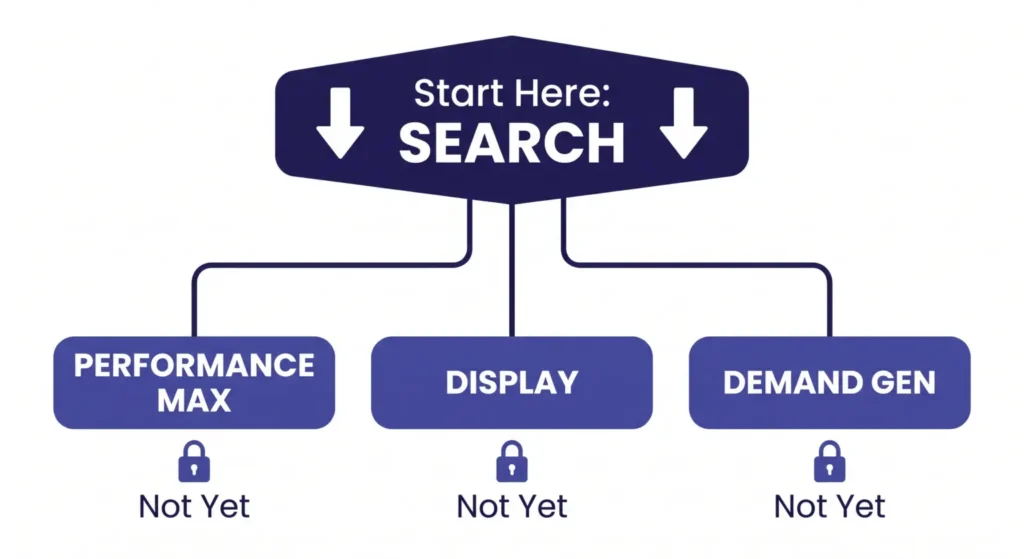
Search campaigns put your ads in front of people actively typing queries into Google. You control which keywords trigger your ads, you write the copy, and you only pay when someone clicks. That combination of intent-targeting and budget control is exactly what you need before you have performance data to feed automated systems.
Performance Max runs across Search, Display, YouTube, Gmail, and Maps at once, and Google’s algorithm decides where your budget goes. Without substantial conversion history, typically 50 or more conversions a month, the algorithm optimizes toward cheap clicks rather than valuable leads. That is a fast way to spend a lot with nothing to show for it.
One exception. If you are a local service business (plumber, electrician, HVAC, locksmith, cleaner), look at Local Service Ads alongside Search. LSAs work on pay-per-lead rather than pay-per-click, include a Google Guaranteed badge, and appear above standard search ads. For home services they are often the cheaper route to a qualified lead. They also depend heavily on your Google Business Profile being complete and well-reviewed, so fix that first. Our guide to Google Business Profile optimization covers what actually moves the needle there.
Step 2: Install Conversion Tracking Before You Spend Anything
This is the most important step in this guide and the one most often skipped. Without conversion tracking installed before your campaign goes live, you know your ads generate clicks. You do not know whether they generate customers. Those are very different pieces of information, and only one of them can be used to make decisions.
Conversion tracking tells Google Ads which clicks resulted in a form submission, a phone call, a purchase, or a booking. Without it, the bidding algorithms have no signal to optimize toward and you have no basis for judging whether the budget is working.
The setup has three parts:
- In Google Ads, go to Goals → Conversions → New conversion action. Choose “Website” for form fills or purchases.
- Install Google Tag Manager on your site if it is not already there. This is the safest way to add tracking without editing your site’s code directly.
- Create the conversion tag in Tag Manager and set it to fire on your confirmation page (the thank-you page after a form submit) or on a specific button click.
WordPress, Shopify, and Squarespace all have native Tag Manager integrations that reduce the technical work considerably. If this step feels out of reach, spend an hour with a developer before committing any ad spend. Everything downstream depends on it.
Track phone calls too. Most small businesses get more leads by phone than by form. Google Ads call tracking uses a forwarding number to attribute calls to specific campaigns. If you skip it, you will systematically under-report your own results and may pause campaigns that were actually working.
Already running ads and not seeing results? Read Google Ads Not Converting? Here Are the 5 Real Reasons (and the Fixes) to diagnose what is going wrong.
Step 3: Work Out Your Budget Backwards, Not Forwards
Almost every guide answers “how much should I spend on Google Ads?” with a range. A range is not an answer. It tells you what other businesses do, not what your business can afford or what it needs to spend to get a result.
The right way to set a Google Ads budget is to start at the end and work backwards. You need six numbers, and you already have five of them.
The six numbers
- Average deal value. What one new customer is worth to you on a first sale.
- Customer lifetime value. What they are worth over the whole relationship. If you do not know, use the first-sale figure and treat everything you calculate as conservative.
- Allowable cost per acquisition. How much of that value you are willing to spend to win it. A common starting point is 20% to 30% of first-sale value for businesses with repeat custom, lower for one-off purchases with thin margins.
- Lead-to-customer close rate. Of the enquiries you get, what percentage become paying customers. Your CRM or your own records will tell you.
- Landing page conversion rate. What percentage of visitors become enquiries. If you have no data, plan on 2% to 5% for a dedicated landing page and treat anything you assume here as the weakest link in the chain.
- Cost per click. The one number you have to look up. Google’s Keyword Planner will give you an estimate for your keywords and location. As a reference point, LocaliQ’s 2026 search advertising benchmarks put the all-industry average Search CPC at $5.42, with average cost per lead at $66.69 and average conversion rate at 8.18%. Your industry will differ, sometimes by a lot. Legal services averaged $9.87 a click, Home and Home Improvement $8.33, Dentists $8.00, while Restaurants and Food came in at $2.05 and Travel at $2.14. Use your own industry figure, not the all-industry average.
Working it through
Here is the arithmetic with illustrative numbers. Substitute your own; these are not benchmarks and they are not drawn from any specific business.
Say your average deal is worth $2,000 and you are willing to spend 20% of that to win one. Your allowable cost per acquisition is $400.
You close 25% of the leads you get. So four leads produce one customer, and your target cost per lead is $400 divided by 4, which is $100.
Your landing page converts 3% of visitors into leads. To get one lead you need roughly 33 clicks. At a $5 CPC, that lead costs you $165.
That is $165 against a $100 target. The campaign does not work at those numbers.
This is the whole point of doing the arithmetic before you spend. You now know exactly which lever has to move, and you know it in advance rather than after three months of spend. You can raise close rate, improve landing page conversion, target cheaper long-tail keywords, or accept a higher allowable CPA because lifetime value justifies it. What you cannot do is fix it by spending more.
Turning it into a monthly number
Once the arithmetic clears, decide how many customers a month you want and multiply. Ten customers at four leads each is 40 leads. At 33 clicks per lead that is 1,320 clicks. At $5 a click that is $6,600 a month.
If that number is far beyond your budget, do not scale the campaign down proportionally and hope. Scale the target down instead. Pick a narrower geography or a single high-value service and fund that properly. A concentrated campaign that generates real data beats a diluted one that generates noise.
Practical floor. Below roughly $1,000 a month in spend, most accounts struggle to accumulate enough clicks and conversions for the data to mean anything within a reasonable timeframe. That is not a rule, it is a consequence of the arithmetic above. If your CPC is $1.50 rather than $5, the floor drops accordingly.
Daily pacing, and what to automate
Set your daily budget by dividing your monthly target by 30.4, not 30. Google can spend up to twice your daily budget on any given day and smooths the total across the month. A $50 daily budget can produce $80 to $100 days without exceeding the monthly total.
On budget automation: automate the arithmetic, not the judgment. A shared budget across campaigns, or a scheduled bid adjustment for the hours you know convert, is fine because you set the rule. Automated budget recommendations that Google generates for you are not, because the algorithm’s objective is spend efficiency within Google’s ecosystem, not your cost per acquisition. Automate anything downstream of a number you calculated. Do not automate the number itself.
If you want to sanity-check the return side of this, our guide to what a good ROAS actually looks like covers how to set a realistic target.
Step 4: Build Your Keyword Strategy Around Buyer Intent
Keywords are the most consequential decision in your setup. The wrong ones drain budget on clicks from people who were never going to buy. The right ones put you in front of people actively looking for what you sell.
Use phrase match or exact match, not broad match
Broad match is Google’s default and the default budget drain. Google interprets your keyword loosely and serves your ad against searches that are semantically adjacent but commercially irrelevant. A broad match keyword like “marketing agency” can trigger on “marketing degree programs” or “marketing job listings.”
Phrase match keeps you in control. A phrase match keyword only triggers when that phrase appears in the search, in that order. Exact match narrows further to searches essentially identical to your keyword. For most small businesses starting out, phrase match is the right default: broad enough to catch variations, tight enough to avoid waste.
Build around commercial intent, not topic
There is a real difference between someone searching “what is Google Ads” and someone searching “Google Ads management for small business.” The first is research. The second is a buyer.
Your campaign targets the second category. Look for modifiers that signal purchase intent: “near me,” “service,” “company,” “pricing,” “cost,” “hire,” “best,” or the specific problem you solve. Informational queries belong in your content strategy, not your ad account. If you want both working together, our comparison of SEO versus PPC covers how to split the two.
Aim for 10 to 20 tightly themed keywords in your first campaign, grouped into two to four ad groups, each with its own landing page.
Add negative keywords from day one
Negative keywords stop your ads showing for searches you do not want. A roofing company does not want clicks from “roofing jobs” or “roofing DIY.”
Add these before launch as a baseline list: free, cheap, DIY, how to, jobs, careers, salary, course, training, definition, meaning, examples, template, reddit, wikipedia. Then review your Search Terms report every week and keep adding.
This is the single highest-return habit in the whole account, and the data is unusually clear on it. In WordStream’s study, accounts with at least one negative keyword averaged a 13% monthly conversion rate. Accounts with none averaged 4.6%. That is close to a 3X difference from a change that costs nothing but attention. And 25% of accounts in the dataset had never added a single one.
One negative keyword is not the point, obviously. The point is that adding even one is a proxy for whether anybody is looking at the account at all.
Step 5: Write Ads That Match Search Intent
Google’s current Search format is Responsive Search Ads. You supply up to 15 headlines (30 characters each) and 4 descriptions (90 characters each), and Google tests combinations.
Two principles separate effective RSAs from generic ones:
Mirror the query in your headlines. If someone types “affordable web design for restaurants,” your strongest headline contains that language, not a generic brand claim. Relevance drives Quality Score, and Quality Score directly determines what you pay per click. Only 22% of accounts in the WordStream study had a Quality Score of 7 or above, which means this is genuinely competitive ground.
Lead with the outcome, not the process. “Get Your First 10 Leads in 30 Days” beats “Experienced Marketing Agency” because it answers the question in the reader’s head: what do I get from clicking?
Include your primary keyword in at least two headlines, your location or service area in one, and a clear call to action in your descriptions. Do not write 15 headlines that all say the same thing. Google needs variety to run a meaningful test.
Step 6: Send Traffic to a Dedicated Landing Page
Your homepage is not a landing page. It is a general introduction to your business. A landing page is a single purpose-built page that continues the conversation the ad started: same offer, same language, same intent.
When someone clicks an ad promising “Google Ads management for small business,” they expect a page about that service, its scope, and how to start. A homepage covering your entire business creates friction and doubt at exactly the moment you have paid for their attention.
A landing page needs five things and nothing else: a headline that echoes the ad, a clear description of the offer, one or two trust signals (a named result, a guarantee, a credential), a short form or prominent phone number, and no competing links. Remove the navigation if you can. Every exit route is a conversion you paid for and lost.
For structure and copy, see our guides to landing pages that convert and the landing page checklist.
Step 7: Choose Your Bidding Strategy Carefully
Bidding strategy determines how Google spends your budget, and picking the wrong one too early is a common and expensive mistake.
Manual CPC. The right choice when your account is new and has fewer than 30 recorded conversions. You set the maximum you will pay per click. You keep control while the algorithm has nothing meaningful to learn from.
Maximize Conversions. Switch to this once you have consistent conversion data, roughly 30 or more per month per campaign. Google can then optimize toward outcomes rather than clicks. Do not use it on a fresh campaign with zero conversion history. It will optimize toward cheap clicks.
Target CPA. Once you know your target cost per acquisition (you calculated it in Step 3) and have the volume to support it, this gives Google a specific goal to bid toward. Needs roughly 30 to 50 conversions in the past 30 days to function.
The sequence is the point. Start manual to gather clean data, then graduate. Skipping that sequence is why many small business campaigns never exit the learning phase.
What to Ignore When Google Ads Tells You to Do It
The interface is designed to encourage spending. Several of its most prominent features work against a small business trying to run an efficient campaign.
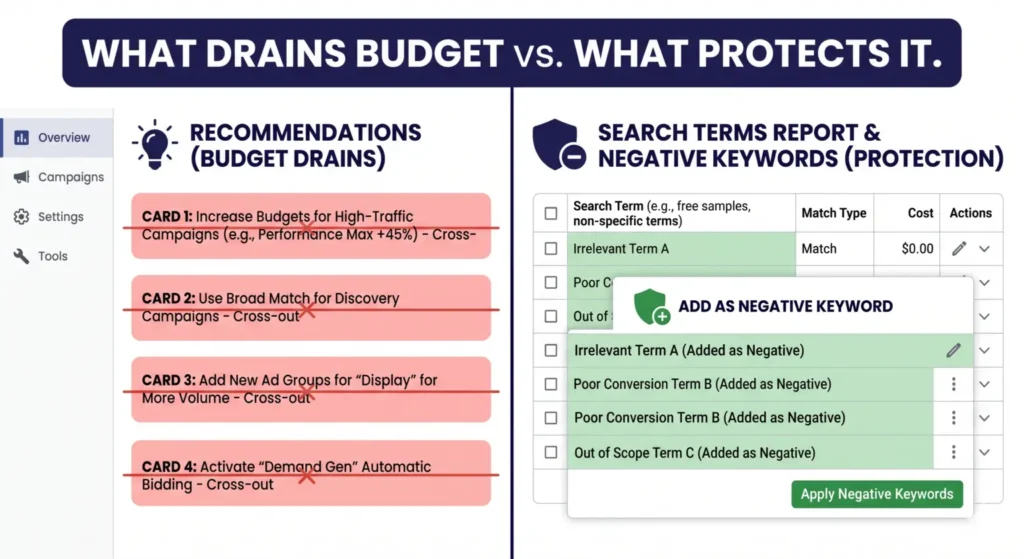
- Recommendations tab. Algorithm-generated suggestions to expand match types, raise budgets, and enable more automation. Frequently counterproductive for small accounts. Review only after four weeks of clean data, and treat the optimization score as a measure of compliance with Google’s preferences, not account health.
- Smart Campaign upgrade prompts. Google will periodically suggest converting your Search campaign to a Smart Campaign for easier management. Decline every time until you have substantial history.
- “Expand your reach” match type suggestions. These nudge you from phrase toward broad. For most small businesses this is a budget leak in waiting.
- Automatically applied recommendations. Go to Settings → Account Settings → Automations and turn off anything you did not explicitly enable. Google can change your keywords, bids, and ad copy without alerting you if these are left on. Check this on day one.
Your First Four Weeks: A Week-by-Week Launch Schedule
The most common mistake after launch is not neglect. It is over-management. Every time you change a bid strategy or restructure an ad group, you reset Google’s learning phase and discard the data you were accumulating.
The schedule below separates what to check from what to leave alone. The second column is the important one.
Week 1: Verify, do not optimize
| Check | Leave alone |
|---|---|
| Conversion tracking is firing. Submit a test form and confirm it registers. | Bids |
| Search Terms report daily. Add obvious junk as negatives. | Budget |
| Ads are approved and serving. Check for disapprovals. | Keywords |
| Spend pacing roughly matches your daily budget. | Bidding strategy |
Week one is a plumbing check. If tracking is broken you want to know in 48 hours, not in 30 days. Nothing else in the account has enough data to justify a change.
Week 2: Prune only
| Check | Leave alone |
|---|---|
| Search Terms report twice this week. Keep adding negatives. | Bidding strategy |
| Which keywords are getting impressions and which are getting none. | Ad copy |
| Any single keyword eating a disproportionate share of spend. | Landing page |
Pausing a keyword that has spent meaningfully with zero conversions is fine. Adding new keywords is not, because you will not be able to tell what caused any change that follows.
Week 3: First real read
| Check | Act on |
|---|---|
| Impression share. Below 50% means budget or bids are too low to compete. | Yes, adjust one of the two |
| Quality Score on your top keywords. Aim for 7 or above. | Fix ad relevance or landing page first, not bids |
| Cost per conversion against the target CPA you calculated in Step 3. | Note it, do not react yet |
Change one variable this week. One. If you change three and performance moves, you have learned nothing about which one did it.
Week 4: Decide
By now you should have enough data to answer three questions:
- Is cost per conversion within range of your target CPA, or is it more than double?
- Which one or two keywords are producing most of your conversions?
- Is your landing page converting at or above the rate you assumed in Step 3?
If cost per conversion is close, concentrate budget on the keywords that are working and cut the rest. If it is more than double, the problem is upstream of the ad account: your offer, your landing page, or your keyword choice. More budget will not fix it.
If you have accumulated 30 or more conversions, this is the point to consider moving from Manual CPC to Maximize Conversions. Below that, stay manual for another month.
Realistic expectation. Your first month is a data collection period, not a revenue driver. Meaningful optimization typically starts after 30 days and 30 or more conversions. Treating month one as a failure because it did not pay for itself is how good campaigns get killed early.
Should You Run This Yourself, or Hand It Over?
The honest answer depends on one number: how many hours a week you can reliably give it.
Self-management works if you can commit two to three hours a week, every week, to reviewing the Search Terms report, adding negatives, checking conversion data, and adjusting one thing at a time. The skills are learnable. Everything in this guide is learnable. The failure mode is almost never capability. It is consistency.
That is what the 29% zero-conversion figure represents. Those are not accounts run by people who could not learn Google Ads. They are accounts nobody looked at.
Hand it over when the hours are not realistic. If you are running the business and the ads are the fourth thing on a list of three, a self-managed campaign will underperform a managed one, and the gap will usually be larger than the management fee. That is a calculation you can actually run: estimate the waste at 36% of spend, which is the study average, and compare it to what management costs.
The thing that matters either way is ownership. Whoever runs your Google Ads, the account should be registered to your business, the conversion data should be yours, and the campaign history should stay with you if the relationship ends. Ad accounts accumulate value over time in the form of conversion history and Quality Score. An agency that sets up your campaigns inside their own MCC account and will not transfer them is holding an asset you paid to build. Ask about this before you sign anything, not after.
This is the principle Tabula is built on. We build the system, we run it with you, and you own it whether you keep us or not. Our Google Ads management for small business work follows exactly the setup in this guide, in an account that stays yours.
The Pre-Launch Checklist
Run through this before your campaign goes live. If you cannot tick every box, you are not ready to spend.
Account and tracking
- Google Ads account registered to an email the business owns
- Automatically applied recommendations turned off
- Conversion tracking installed and tested with a live submission
- Call tracking enabled if phone enquiries matter to you
- Google Analytics linked to the Ads account
Budget
- Average deal value and close rate documented
- Allowable cost per acquisition calculated
- Target cost per lead calculated
- CPC checked in Keyword Planner for your keywords and location
- The arithmetic clears, meaning projected cost per lead is at or below target
- Daily budget set at monthly target divided by 30.4
Campaign
- Search campaign selected, not Performance Max or Smart
- Search Partner Network and Display Network expansion turned off
- Geographic targeting set to “presence” rather than “presence or interest”
- Two to four ad groups, each with a single theme
- 10 to 20 keywords total, phrase or exact match only
- Baseline negative keyword list added
Manual CPC bidding selected
- Ad schedule set to hours you can actually answer enquiries
Ads and landing page
- At least 8 distinct headlines per ad group, primary keyword in two of them
- Location in one headline
- Clear call to action in the descriptions
- Dedicated landing page per ad group, matching the ad’s language
- Landing page form tested end to end
- Page loads in under three seconds on mobile
Common Questions About Setting Up Google Ads for Small Businesses
How much should a small business spend on Google Ads?
Do not start with a number. Start with your average deal value, close rate, and landing page conversion rate, and work backwards to a cost per lead you can afford. Then check that against real CPCs in Keyword Planner. Most accounts need at least $1,000 a month to generate meaningful data, but that floor moves with your CPC. A $1.50 CPC market needs far less than a $15 one.
Can I run Google Ads for my small business without hiring an agency?
Yes, if you can give it two to three hours a week consistently: reviewing search terms, adding negatives, and checking conversion data. The failure mode is not skill, it is inconsistency. Campaigns left unreviewed for a month drift toward broad, irrelevant traffic. If those hours are not realistic, managed will usually cost less than self-managed waste.
What does it cost to set up a Google Ads campaign, separate from ad spend?
Setup inside the platform is free. The real costs sit around it: developer time if you need help installing conversion tracking, a dedicated landing page if you do not have one, and your own hours. Budget for those before ad spend, because a campaign without tracking or a proper landing page will underperform regardless of how much you put behind it.
Is there a Google Ads setup tool designed specifically for small businesses?
Google’s own Smart Campaigns are marketed as one, but they remove the controls that make small budgets work. Keyword Planner and Google Tag Manager are the two platform tools genuinely worth using during setup. Beyond that, a structured checklist like the one above will serve you better than a tool, because the decisions that matter are about your business, not the platform.
What is the difference between Google Ads and Google Local Service Ads?
Standard Google Ads charges per click regardless of whether that click becomes a lead. Local Service Ads charge per lead, so you only pay when someone calls or messages from the ad. LSAs also carry a Google Guaranteed badge and sit above standard search ads. For home service businesses they are often the more cost-efficient starting point, though they depend on a strong Google Business Profile.
How long before Google Ads starts working?
Campaigns enter a learning phase for the first one to two weeks while the algorithm gathers data. Meaningful optimization typically begins after 30 days and 30 or more conversions. Expect month one to be a data collection period. That is normal, not a sign the campaign has failed, and reacting to it by changing settings weekly will make it worse.
The Setup Is the Strategy
Most Google Ads waste happens before a single impression is served. The campaign type you choose, the match types you use, the tracking you install or skip, and the arithmetic you do or do not do will determine most of your results long before any algorithm gets a chance to optimize.
The advantage small businesses have is real and the data supports it. In the WordStream dataset, the accounts with the least reach converted best, and the top performers were not the biggest spenders. That advantage comes from constraint. A small budget forces the focus that large budgets let you avoid.
Run one tightly scoped Search campaign. Calculate your numbers before you spend. Track conversions from day one. Add negative keywords every week. Then, and only then, give Google’s automation something worth optimizing.
Get a Free Google Ads Audit
Not sure whether your current setup is working, or about to launch into one of the traps above? We will review your campaign structure, keyword strategy, and conversion tracking, and tell you exactly what to fix. The account stays yours either way.

Author
Carlos Rios
Carlos Rios is the Founder of Tabula. Before starting the agency, he spent his career inside companies — reporting to leaders who had no patience for vanity metrics and wanted straight answers about what was working and why. He built Tabula around that same standard: a marketing system the client owns, powered by AI and led by experts who explain the plan in plain language. Carlos studied philosophy for six years at York University and holds a Master's in Marketing from the Schulich School of Business.